
Project-5
Windows Rg error popup style- use in other projects for nostalgic feel
This application can popup nostalgia error like in windous ME/RG
In this image you can see how this looks
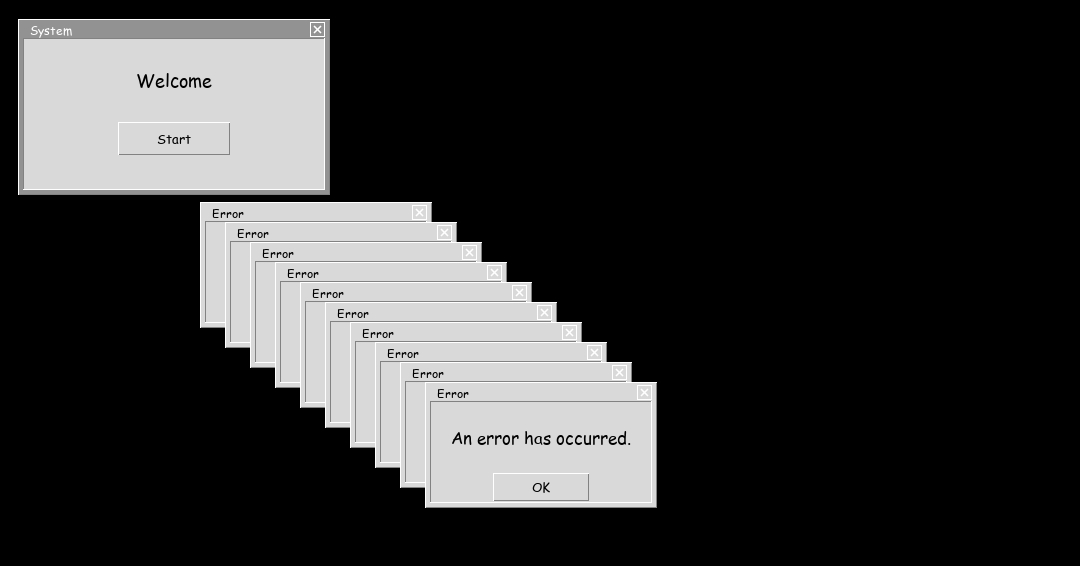
No extra package is neee for this projecct.
Download Project
You must agree our terms and conditions before downloading.
 Download errorpopup.py
Tap this code and select "copy" button to copy this code.
Code source
import tkinter as tk

ERROR_COUNT = 10
DELAY_MS = 50
error_windows = []  # store all popups here

def start_errors():
    error_windows.clear()
    for i in range(ERROR_COUNT):
        root.after(i * DELAY_MS, lambda i=i: create_error(i))

def create_error(i):
    base_x = 200
    base_y = 200

    err = tk.Toplevel(root)
    err.title("Error")
    err.geometry(f"220x100+{base_x + i*25}+{base_y + i*20}")
    err.resizable(False, False)
    err.attributes("-topmost", True)

    error_windows.append(err)

    label = tk.Label(
        err,
        text="An error has occurred.",
        font=("MS Sans Serif", 10)
    )
    label.pack(pady=20)

    btn = tk.Button(err, text="OK", width=8, command=clear_all_errors)
    btn.pack()

def clear_all_errors():
    for win in error_windows:
        if win.winfo_exists():
            win.destroy()
    error_windows.clear()


root = tk.Tk()
root.title("System")
root.geometry("300x150")
root.resizable(False, False)

title = tk.Label(
    root,
    text="Welcome",
    font=("MS Sans Serif", 11)
)
title.pack(pady=25)

start_btn = tk.Button(root, text="Start", width=10, command=start_errors)
start_btn.pack()

root.mainloop()